【万字实战】动手写一个 JavaScript 解释器
前言
在这篇文章中,我们将通过 JS 构建我们自己的 JS 解释器,用 JS 写 JS,这听起来很奇怪,尽管如此,这样做我们将更熟悉 JS,也可以学习 JS 引擎是如何工作的!
什么是解释器 (Interpreter) ?
解释器是在运行时运行的语言求值器,它动态地执行程序的源代码。解释器解析源代码,从源代码生成 AST(抽象语法树),遍历 AST 并逐个计算它们。
解释器 (Interpreter) 工作原理
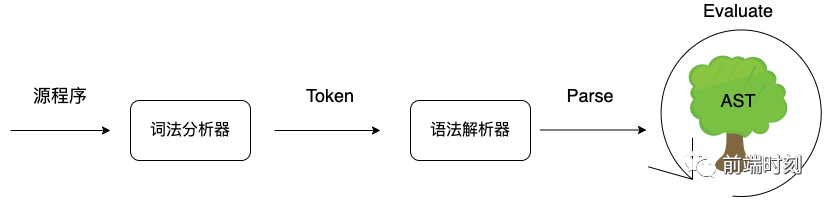
词法分析 (Tokenization)
语法解析 (Parsing)
求值 (Evaluating)
词法分析 (Tokenization)
将源代码分解并组织成一组有意义的单词,这一过程即为词法分析(Token)。
在英语中,当我们遇到这样一个语句时:
Javascript is the best language in the world
我们会下意识地把句子分解成一个个单词:
+----------------------------------------------------------+
| Javascript | is | the | best | language | in |the |world |
+----------------------------------------------------------+
这是分析和理解句子的第一阶段。
词法分析是由词法分析器完成的,词法分析器会扫描(scanning)代码,提取词法单元。
var a = 1;

[
  ("var": "keyword"),
  ("a": "identifier"),
  ("=": "assignment"),
  ("1": "literal"),
  (";": "separator"),
];
词法分析器将代码分解成 Token 后,会将 Token 传递给解析器进行解析,我们来看下解析阶段是如何工作的。
语法解析 (Parsing)
将词法分析阶段生成的 Token 转换为抽象语法树(Abstract Syntax Tree),这一过程称之为语法解析(Parsing)。
在英语中,Javascript is the best language 被分解为以下单词:
+------------------------------------------+
| Javascript | is | the | best | language  |
+------------------------------------------+
这样我们就可以挑选单词并形成语法结构:
"Javascript": Subject
"is the best language": Predicate
"language": Object
Javascript 在语法中是一个主语名词,其余的是一个没有什么意义的句子叫做谓语,language 是动作的接受者,也就是宾语。结构是这样的:
Subject(Noun) -> Predicate -> Object
语法解析是由语法解析器完成的,它会将上一步生成的 Token,根据语法规则,转为抽象语法树(AST)。
{
  type: "Program",
  body: [
    {
      type: "VariableDeclaration",
      declarations: [
        {
          type: "VariableDeclarator",
          id: {
            type: "Identifier",
            name: "sum"
          },
          init: {
            type: "Literal",
            value: 30,
            raw: "30"
          }
        }
      ],
      kind: "var"
    }
  ],
}
求值阶段 (Evaluating)
解释器将遍历 AST 并计算每个节点。- 求值阶段
1 + 2
|
    |
    v
+---+  +---+
| 1 |  | 2 |
+---+  +---+
  \     /
   \   /
    \ /
   +---+
   | + |
   +---+
{
    lhs: 1,
    op: '+'.
    rhs: 2
}
解释器解析 Ast,得到 LHS 节点,接着收集到操作符(operator)节点+,+操作符表示需要进行一次加法操作,它必须有第二个节点来进行加法操作.接着他收集到 RHS 节点。它收集到了有价值的信息并执行加法得到了结果,3。
{
  type: "Program",
  body: [
    {
      type: "ExpressionStatement",
      expression: {
        type: "BinaryExpression",
        left: {
          type: "Literal",
          value: 1,
          raw: "1"
        },
        operator: "+",
        right: {
          type: "Literal",
          value: 2,
          raw: "2"
        }
      }
    }
  ],
}
实践
前面我们已经介绍了解释器的工作原理,接下来我们来动动手松松筋骨吧,实现一个 Mini Js Interpreter~
实践准备
Acorn.js
A tiny, fast JavaScript parser, written completely in JavaScript. 一个完全使用 javascript 实现的,小型且快速的 javascript 解析器
本次实践我们将使用 acorn.js ,它会帮我们进行词法分析,语法解析并转换为抽象语法树。
Webpack/Rollup/Babel(@babel/parser) 等第三方库也是使用 acorn.js 作为自己 Parser 的基础库。(站在巨人的肩膀上啊!)
The Estree Spec
最开始 Mozilla JS Parser API 是 Mozilla 工程师在 Firefox 中创建的 SpiderMonkey 引擎输出 JavaScript AST 的规范文档,文档所描述的格式被用作操作 JAvaScript 源代码的通用语言。
随着 JavaScript 的发展,更多新的语法被加入,为了帮助发展这种格式以跟上 JavaScript 语言的发展。The ESTree Spec 就诞生了,作为参与构建和使用这些工具的人员的社区标准。
acorn.js parse 返回值符合 ESTree spec 描述的 AST 对象,这里我们使用@types/estree 做类型定义。
Jest
号称令人愉快的 JavaScript 测试...我们使用它来进行单元测试.
Rollup
Rollup 是一个 JavaScript 模块打包器,我们使用它来打包,以 UMD 规范对外暴露模块。
项目初始化
// visitor.ts 创建一个Visitor类,并提供一个方法操作ES节点。
import * as ESTree from "estree";
class Visitor {
  visitNode(node: ESTree.Node) {
    // ...
  }
}
export default Visitor;
// interpreter.ts 创建一个Interpreter类,用于运行ES节点树。
// 创建一个Visitor实例,并使用该实例来运行ESTree节点
import Visitor from "./visitor";
import * as ESTree from "estree";
class Interpreter {
  private visitor: Visitor;
  constructor(visitor: Visitor) {
    this.visitor = visitor;
  }
  interpret(node: ESTree.Node) {
    this.visitor.visitNode(node);
  }
}
export default Interpreter;
// vm.ts 对外暴露run方法,并使用acorn code->ast后,交给Interpreter实例进行解释。
const acorn = require("acorn");
import Visitor from "./visitor";
import Interpreter from "./interpreter";

const jsInterpreter = new Interpreter(new Visitor());

export function run(code: string) {
  const root = acorn.parse(code, {
    ecmaVersion: 8,
    sourceType: "script",
  });
  return jsInterpreter.interpret(root);
}
实践第 1 弹: 1+1= ?
我们这节来实现 1+1 加法的解释。首先我们通过AST explorer,看看 1+1 这段代码转换后的 AST 结构。
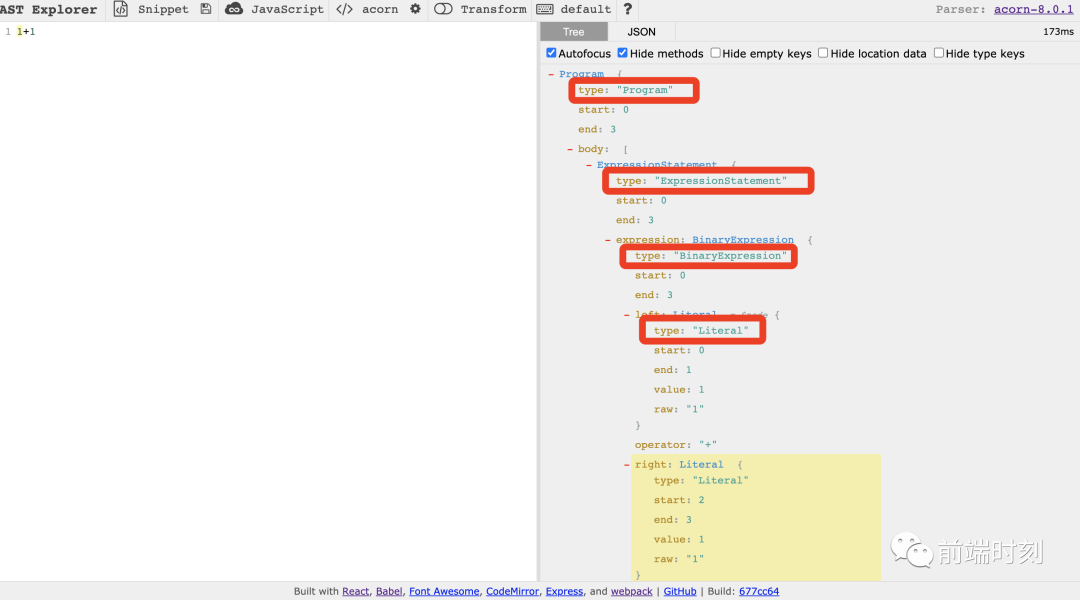
我们可以看到这段代码中存在 4 种节点类型,下面我们简单的介绍一下它们:
Program
根节点,即代表一整颗抽象语法树,body 属性是一个数组,包含了多个 Statement 节点。
interface Program {
  type: "Program";
  sourceType: "script" | "module";
  body: Array


     ;


  comments?:

     Array


      ;


}
ExpressionStatement
表达式语句节点,expression 属性指向一个表达式节点对象
interface ExpressionStatement {
  type: "ExpressionStatement";
  expression: Expression;
}
BinaryExpression
二元运算表达式节点,left 和 right 表示运算符左右的两个表达式,operator 表示一个二元运算符。本节实现的重点,简单理解,我们只要拿到 operator 操作符的类型并实现,然后对 left,right 值进行求值即可。
interface BinaryExpression {
  type: "BinaryExpression";
  operator: BinaryOperator;
  left: Expression;
  right: Expression;
}
Literal
字面量,这里不是指 [] 或者 {} 这些,而是本身语义就代表了一个值的字面量,如 1,“hello”, true 这些,还有正则表达式,如 /\d?/。
type Literal = SimpleLiteral | RegExpLiteral;

interface SimpleLiteral {
  type: "Literal";
  value: string | boolean | number | null;
  raw?: string;
}

interface RegExpLiteral {
  type: "Literal";
  value?: RegExp | null;
  regex: {
    pattern: string;
    flags: string;
  };
  raw?: string;
}
废话少说,开撸!!!
// standard/es5.ts 实现以上节点方法

import Scope from "../scope";
import * as ESTree from "estree";
import { AstPath } from "../types/index";

const es5 = {
  // 根节点的处理很简单,我们只要对它的body属性进行遍历,然后访问该节点即可。
  Program(node: ESTree.Program) {
    node.body.forEach((bodyNode) => this.visitNode(bodyNode));
  },
  // 表达式语句节点的处理,同样访问expression 属性即可。
  ExpressionStatement(node: ESTree.ExpressionStatement>) {
    return this.visitNode(node.expression);
  },
  // 字面量节点处理直接求值,这里对正则表达式类型进行了特殊处理,其他类型直接返回value值即可。
  Literal(node: ESTree.Literal>) {
    if ((


     node).regex) {


     const { pattern, flags } = (


      node).regex;


      return

      new

      RegExp(pattern, flags);


    }

      else

      return node.value;


  },


      // 二元运算表达式节点处理


      // 对left/node两个节点(Literal)进行求值,然后实现operator类型运算,返回结果。


      BinaryExpression(node: ESTree.BinaryExpression>) {


      const leftNode =

      this.visitNode(node.left);


      const operator = node.operator;


      const rightNode =

      this.visitNode(node.right);


      return {


      "+": (l, r) => l + r,


      "-": (l, r) => l - r,


      "*": (l, r) => l * r,


      "/": (l, r) => l / r,


      "%": (l, r) => l % r,


      "<": (l, r) => l < r,


      ">": (l, r) => l > r,


      "<=": (l, r) => l <= r,


      ">=": (l, r) => l >= r,


      "==": (l, r) => l == r,


      "===": (l, r) => l === r,


      "!=": (l, r) => l != r,


      "!==": (l, r) => l !== r,


    }[operator](leftNode, rightNode);


  },


};


      export

      default es5;
// visitor.ts
import Scope from "./scope";
import * as ESTree from "estree";
import es5 from "./standard/es5";

const VISITOR = {
  ...es5,
};
class Visitor {
  // 实现访问节点方法,通过节点类型访问对应的节点方法
  visitNode(node: ESTree.Node) {
    return {
      visitNode: this.visitNode,
      ...VISITOR,
    }[node.type](node);
  }
}
export default Visitor;
就这样,普通的二元运算就搞定啦!!!
实践第 2 弹: 怎么找到变量?
Javascript 的作用域与作用域链的概念想必大家都很熟悉了,这里就不再啰嗦了~
是的,我们需要通过实现作用域来访问变量,实现作用域链来搜寻标识符。
在这之前,我们先实现 Variable 类,实现变量的存取方法。
// variable.ts
export enum Kind {
  var = "var",
  let = "let",
  const = "const",
}
export type KindType = "var" | "let" | "const";
export class Variable {
  private _value: any;
  constructor(public kind: Kind, val: any) {
    this._value = val;
  }
  get value() {
    return this._value;
  }
  set value(val: any) {
    this._value = val;
  }
}
import { Variable, Kind, KindType } from "./variable";

class Scope {
  // 父作用域
  private parent: Scope | null;
  // 当前作用域
  private targetScope: { [key: string]: any };
  constructor(public readonly type, parent?: Scope) {
    this.parent = parent || null;
    this.targetScope = new Map();
  }
  // 是否已定义
  private hasDefinition(rawName: string): boolean {
    return Boolean(this.search(rawName));
  }
  // var类型变量定义
  public defineVar(rawName: string, value: any) {
    let scope: Scope = this;
    // 如果不是全局作用域且不是函数作用域,找到全局作用域,存储变量
    // 这里就是我们常说的Hoisting (变量提升)
    while (scope.parent && scope.type !== "function") {
      scope = scope.parent;
    }
    // 存储变量
    scope.targetScope.set(rawName, new Variable(Kind.var, value));
  }
  // let类型变量定义
  public defineLet(rawName: string, value: any) {
    this.targetScope.set(rawName, new Variable(Kind.let, value));
  }
  // const类型变量定义
  public defineConst(rawName: string, value: any) {
    this.targetScope.set(rawName, new Variable(Kind.const, value));
  }
  // 作用域链实现,向上查找标识符
  public search(rawName: string): Variable | null {
    if (this.targetScope.get(rawName)) {
      return this.targetScope.get(rawName);
    } else if (this.parent) {
      return this.parent.search(rawName);
    } else {
      return null;
    }
  }
  // 变量声明方法,变量已定义则抛出语法错误异常
  public declare(kind: Kind | KindType, rawName: string, value: any) {
    if (this.hasDefinition(rawName)) {
      console.error(
        `Uncaught SyntaxError: Identifier '${rawName}' has already been declared`
      );
      return true;
    }
    return {
      [Kind.var]: () => this.defineVar(rawName, value),
      [Kind.let]: () => this.defineLet(rawName, value),
      [Kind.const]: () => this.defineConst(rawName, value),
    }[kind]();
  }
}

export default Scope;
以上就是变量对象,作用域及作用域链的基础实现了,接下来我们就可以定义及访问变量了。
实践第 3 弹: var age = 18
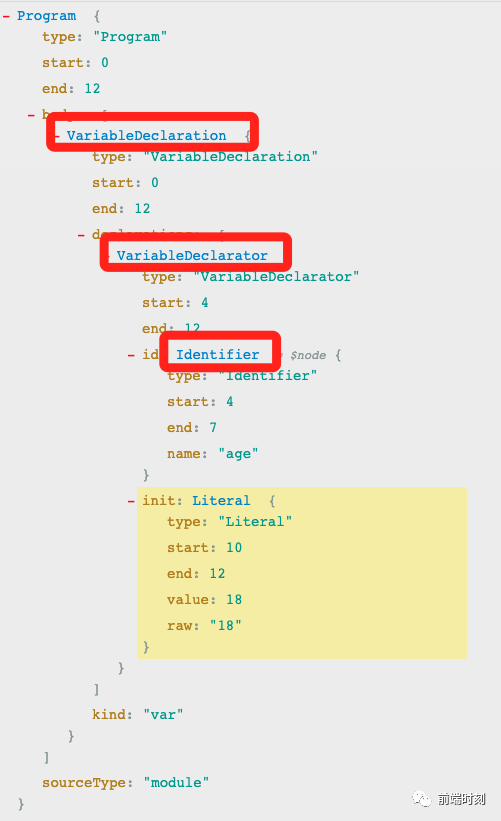
从语法树中我们可以看到三个陌生的节点类型,来看看它们分别代表什么意思:
VariableDeclaration
变量声明,kind 属性表示是什么类型的声明,因为 ES6 引入了 const/let。declarations 表示声明的多个描述,因为我们可以这样:let a = 1, b = 2;。
interface VariableDeclaration {
  type: "VariableDeclaration";
  declarations: Array


     ;


  kind:

     "var" |

     "let" |

     "const";


}
VariableDeclarator
变量声明的描述,id 表示变量名称节点,init 表示初始值的表达式,可以为 null。
interface VariableDeclarator {
  type: "VariableDeclarator";
  id: Pattern;
  init?: Expression | null;
}
Identifier
顾名思义,标识符节点,我们写 JS 时定义的变量名,函数名,属性名,都归为标识符。
interface Identifier {
  type: "Identifier";
  name: string;
}
了解了对应节点的含义后,我们来进行实现:
// standard/es5.ts 实现以上节点方法

import Scope from "../scope";
import * as ESTree from "estree";

type AstPath


      = {


  node: T;


  scope: Scope;


};


     const es5 = {


     // ...


     // 这里我们定义了astPath,新增了scope作用域参数


     VariableDeclaration(astPath: AstPath


      ) {


      const { node, scope } = astPath;


      const { declarations, kind } = node;


      // 上面提到,生声明可能存在多个描述(let a = 1, b = 2;),所以我们这里对它进行遍历:


      // 这里遍历出来的每个item是VariableDeclarator节点


    declarations.forEach((declar) => {


      const { id, init } =


       declar;


       // 变量名称节点,这里拿到的是age


       const key = (


        id).name;


        // 判断变量是否进行了初始化 ? 查找init节点值(Literal类型直接返回值:18) : 置为undefined;


        const value = init ?

        this.visitNode(init, scope) :

        undefined;


        // 根据不同的kind(var/const/let)声明进行定义,即var age = 18


      scope.declare(kind, key, value);


    });


  },


        // 标识符节点,我们只要通过访问作用域,访问该值即可。


        Identifier(astPath: AstPath


         ) {


         const { node, scope } = astPath;


         const name = node.name;


         // walk identifier


         // 这个例子中查找的是age变量


         const variable = scope.search(name);


         // 返回的是定义的变量对象(age)的值,即18


         if (variable)

         return variable.value;


 },


};


         export

         default es5;
实践第 4 弹: module.exports = 6
我们先来看看 module.exports = 6 对应的 AST。
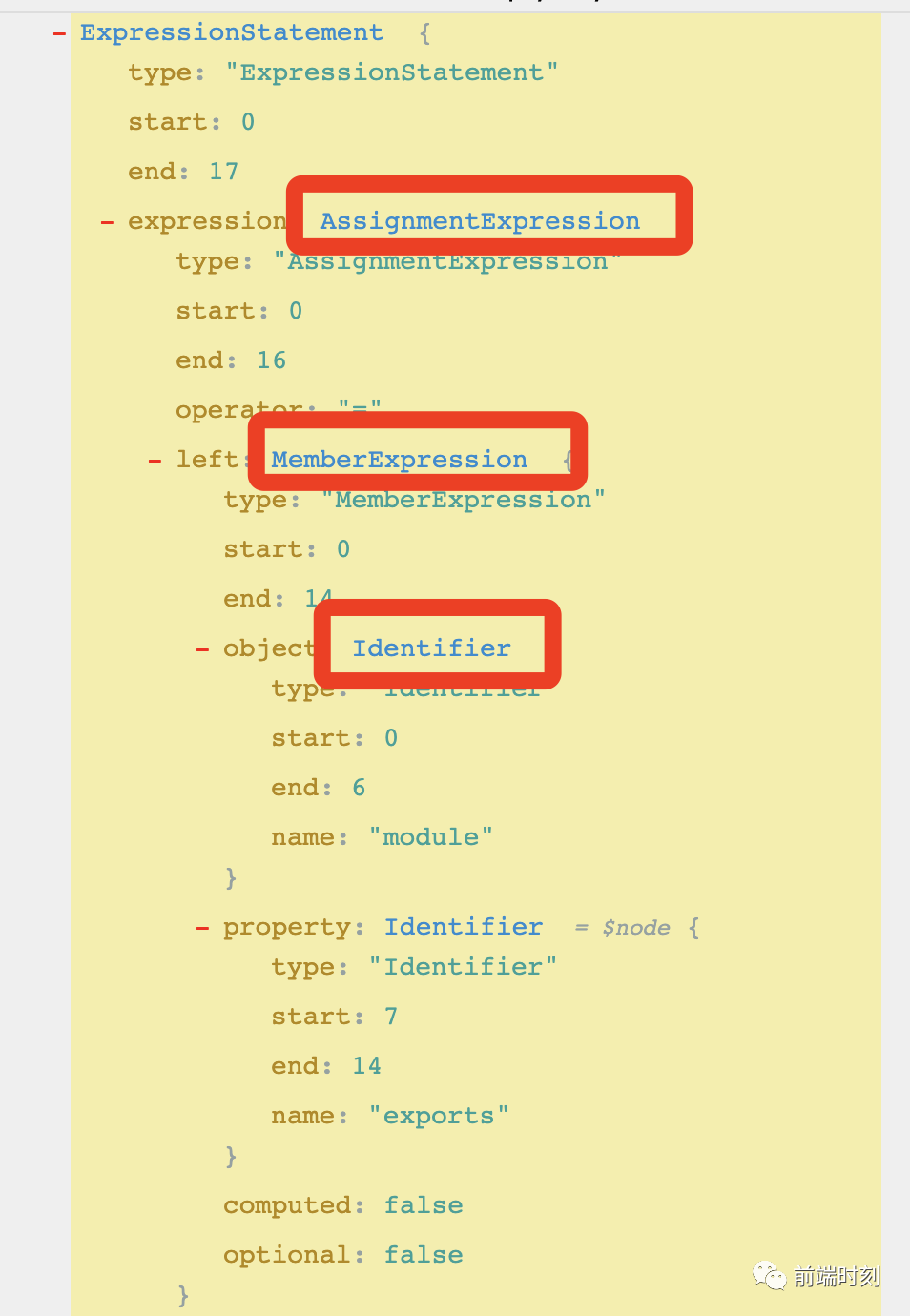
从语法树中我们又看到两个陌生的节点类型,来看看它们分别代表什么意思:
AssignmentExpression
赋值表达式节点,operator 属性表示一个赋值运算符,left 和 right 是赋值运算符左右的表达式。
interface AssignmentExpression {
  type: "AssignmentExpression";
  operator: AssignmentOperator;
  left: Pattern | MemberExpression;
  right: Expression;
}
MemberExpression
成员表达式节点,即表示引用对象成员的语句,object 是引用对象的表达式节点,property 是表示属性名称,computed 如果为 false,是表示 . 来引用成员,property 应该为一个 Identifier 节点,如果 computed 属性为 true,则是 [] 来进行引用,即 property 是一个 Expression 节点,名称是表达式的结果值。
interface MemberExpression {
  type: "MemberExpression";
  object: Expression | Super;
  property: Expression;
  computed: boolean;
  optional: boolean;
}
我们先来定义 module.exports 变量。
import Scope from "./scope";
import Visitor from "./visitor";
import * as ESTree from "estree";
class Interpreter {
  private scope: Scope;
  private visitor: Visitor;
  constructor(visitor: Visitor) {
    this.visitor = visitor;
  }
  interpret(node: ESTree.Node) {
    this.createScope();
    this.visitor.visitNode(node, this.scope);
    return this.exportResult();
  }
  createScope() {
    // 创建全局作用域
    this.scope = new Scope("root");
    // 定义module.exports
    const $exports = {};
    const $module = { exports: $exports };
    this.scope.defineConst("module", $module);
    this.scope.defineVar("exports", $exports);
  }
  // 模拟commonjs,对外暴露结果
  exportResult() {
    // 查找module变量
    const moduleExport = this.scope.search("module");
    // 返回module.exports值
    return moduleExport ? moduleExport.value.exports : null;
  }
}
export default Interpreter;
ok,下面我们来实现以上节点函数~
// standard/es5.ts 实现以上节点方法

import Scope from "../scope";
import * as ESTree from "estree";

type AstPath


      = {


  node: T;


  scope: Scope;


};


     const es5 = {


     // ...


     // 这里我们定义了astPath,新增了scope作用域参数


     MemberExpression(astPath: AstPath


      ) {


      const { node, scope } = astPath;


      const {

      object, property, computed } = node;


      // property 是表示属性名称,computed 如果为 false,property 应该为一个 Identifier 节点,如果 computed 属性为 true,即 property 是一个 Expression 节点


      // 这里我们拿到的是exports这个key值,即属性名称


      const prop = computed


      ?

      this.visitNode(property, scope)


      : (


       property).name;


       // object 表示对象,这里为module,对module进行节点访问


       const obj =

       this.visitNode(

       object, scope);


       // 访问module.exports值


       return obj[prop];


  },


       // 赋值表达式节点


  (astPath: AstPath


        ) {


        const { node, scope } = astPath;


        const { left, operator, right } = node;


        let assignVar;


        // LHS 处理


        if (left.type ===

        "Identifier") {


        // 标识符类型 直接查找


        const value = scope.search(left.name);


      assignVar = value;


    }

        else

        if (left.type ===

        "MemberExpression") {


        // 成员表达式类型,处理方式跟上面差不多,不同的是这边需要自定义一个变量对象的实现


        const {

        object, property, computed } = left;


        const obj =

        this.visitNode(

        object, scope);


        const key = computed


        ?

        this.visitNode(property, scope)


        : (


         property).name;


 assignVar = {


         get

         value() {


         return obj[key];


 },


         set

         value(v) {


 obj[key] = v;


 },


 };


 }


         // RHS


         // 不同操作符处理,查询到right节点值,对left节点进行赋值。


         return {


         "=": (v) => {


 assignVar.value = v;


         return v;


 },


         "+=": (v) => {


         const value = assignVar.value;


 assignVar.value = v + value;


         return assignVar.value;


 },


         "-=": (v) => {


         const value = assignVar.value;


 assignVar.value = value - v;


         return assignVar.value;


 },


         "*=": (v) => {


         const value = assignVar.value;


 assignVar.value = v * value;


         return assignVar.value;


 },


         "/=": (v) => {


         const value = assignVar.value;


 assignVar.value = value / v;


         return assignVar.value;


 },


         "%=": (v) => {


         const value = assignVar.value;


 assignVar.value = value % v;


         return assignVar.value;


 },


 }[operator](

         this.visitNode(right, scope));


 },


};


         export

         default es5;
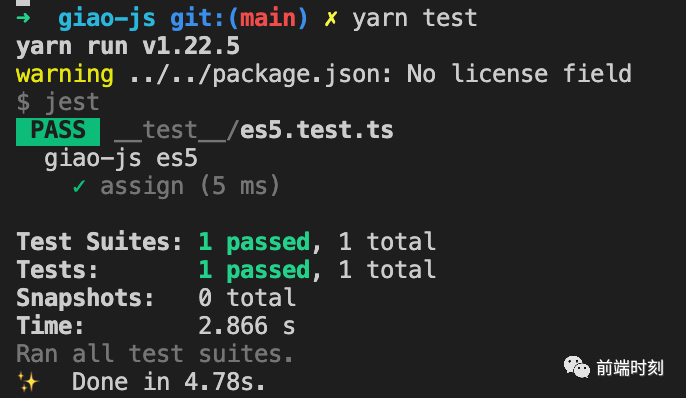
ok,实现完毕,是时候验证一波了,上 jest 大法。
// __test__/es5.test.ts

import { run } from "../src/vm";
describe("giao-js es5", () => {
  test("assign", () => {
    expect(
      run(`
      module.exports = 6;
    `)
    ).toBe(6);
  });
}
实践第 5 弹: for 循环
var result = 0;
for (var i = 0; i < 5; i++) {
  result += 2;
}
module.exports = result;
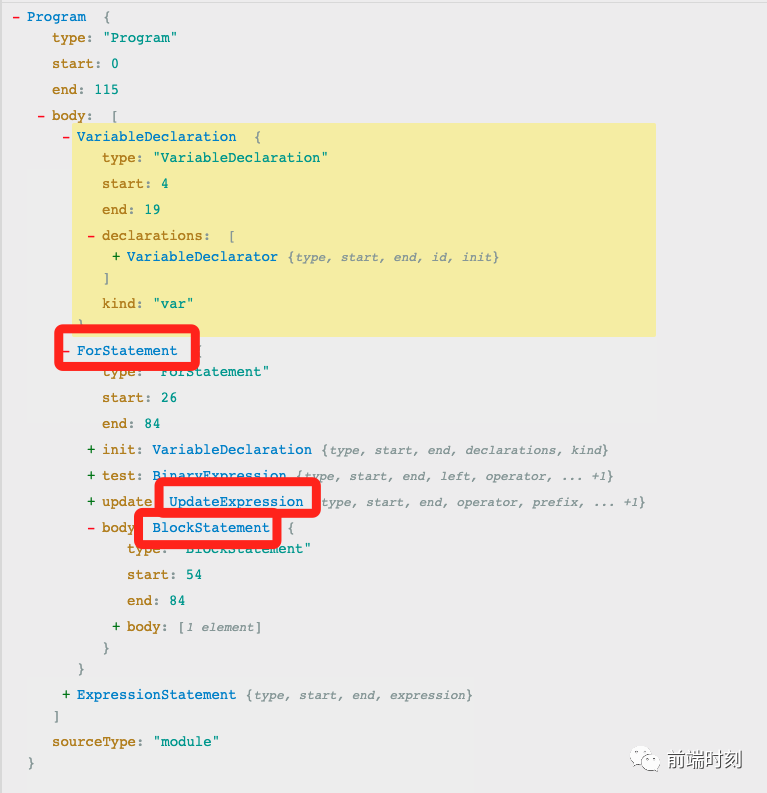
到这一弹大家都发现了,不同的语法其实对应的就是不同的树节点,我们只要实现对应的节点函数即可.我们先来看看这几个陌生节点的含义.
ForStatement
for 循环语句节点,属性 init/test/update 分别表示了 for 语句括号中的三个表达式,初始化值,循环判断条件,每次循环执行的变量更新语句(init 可以是变量声明或者表达式)。这三个属性都可以为 null,即 for(;;){}。
body 属性用以表示要循环执行的语句。
interface ForStatement {
  type: "ForStatement";
  init?: VariableDeclaration | Expression | null;
  test?: Expression | null;
  update?: Expression | null;
  body: Statement;
}
UpdateExpression
update 运算表达式节点,即 ++/--,和一元运算符类似,只是 operator 指向的节点对象类型不同,这里是 update 运算符。
interface UpdateExpression {
  type: "UpdateExpression";
  operator: UpdateOperator;
  argument: Expression;
  prefix: boolean;
}
BlockStatement
块语句节点,举个例子:if (...) { // 这里是块语句的内容 },块里边可以包含多个其他的语句,所以有一个 body 属性,是一个数组,表示了块里边的多个语句。
interface BlockStatement {
  0;
  type: "BlockStatement";
  body: Array


     ;


  innerComments?:

     Array


      ;


}
废话少说,盘它!!!
// standard/es5.ts 实现以上节点方法

import Scope from "../scope";
import * as ESTree from "estree";

type AstPath


      = {


  node: T;


  scope: Scope;


};


     const es5 = {


     // ...


     // for 循环语句节点


     ForStatement(astPath: AstPath


      ) {


      const { node, scope } = astPath;


      const { init, test, update, body } = node;


      // 这里需要注意的是需要模拟创建一个块级作用域


      // 前面Scope类实现,var声明在块作用域中会被提升,const/let不会


      const forScope =

      new Scope(

      "block", scope);


      for (


      // 初始化值


      // VariableDeclaration


      init ?

      this.visitNode(init, forScope) :

      null;


      // 循环判断条件(BinaryExpression)


      // 二元运算表达式,之前已实现,这里不再细说


      test ?

      this.visitNode(test, forScope) :

      true;


      // 变量更新语句(UpdateExpression)


      update ?

      this.visitNode(update, forScope) :

      null


    ) {


      // BlockStatement


      this.visitNode(body, forScope);


    }


  },


      // update 运算表达式节点


      // update 运算表达式节点,即 ++/--,和一元运算符类似,只是 operator 指向的节点对象类型不同,这里是 update 运算符。


      UpdateExpression(astPath: AstPath


       ) {


       const { node, scope } = astPath;


       // update 运算符,值为 ++ 或 --,配合 update 表达式节点的 prefix 属性来表示前后。


       const { prefix, argument, operator } = node;


       let updateVar;


       // 这里需要考虑参数类型还有一种情况是成员表达式节点


       // 例: for (var query={count:0}; query.count < 8; query.count++)


       // LHS查找


       if (argument.type ===

       "Identifier") {


       // 标识符类型 直接查找


       const value = scope.search(argument.name);


      updateVar = value;


    }

       else

       if (argument.type ===

       "MemberExpression") {


       // 成员表达式的实现在前面实现过,这里不再细说,一样的套路~


       const {

       object, property, computed } = argument;


       const obj =

       this.visitNode(

       object, scope);


       const key = computed


        ?

       this.visitNode(property, scope)


        : (


        property).name;


      updateVar = {


        get

        value() {


        return obj[key];


        },


        set

        value(v) {


          obj[key] = v;


        },


      };


    }


        return {


        "++": (v) => {


        const result = v.value;


        v.value = result +

        1;


        // preifx? ++i: i++;


        return prefix ? v.value : result;


      },


        "--": (v) => {


        const result = v.value;


        v.value = result -

        1;


        // preifx? --i: i--;


        return prefix ? v.value : result;


      },


    }[operator](updateVar);


  },


        // 块语句节点


        // 块语句的实现很简单,模拟创建一个块作用域,然后遍历body属性进行访问即可。


        BlockStatement(astPath: AstPath


         ) {


         const { node, scope } = astPath;


         const blockScope =

         new Scope(

         "block", scope);


         const { body } = node;


 body.forEach((bodyNode) => {


         this.visitNode(bodyNode, blockScope);


 });


 },


};


         export

         default es5;
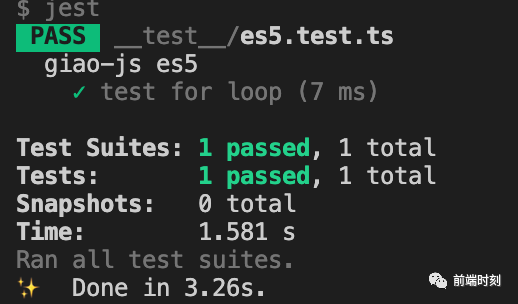
上 jest 大法验证一哈~
test("test for loop", () => {
  expect(
    run(`
      var result = 0;
      for (var i = 0; i < 5; i++) {
        result += 2;
      }
      module.exports = result;
    `)
  ).toBe(10);
});
你以为这样就结束了吗? 有没有想到还有什么情况没处理? for 循环的中断语句呢?
var result = 0;
for (var i = 0; i < 5; i++) {
  result += 2;
  break; // break,continue,return
}
module.exports = result;
感兴趣的小伙伴可以自己动手试试,或者戳源码地址
结语
giao-js目前只实现了几个语法,本文只是提供一个思路。
有兴趣的同学可以查看完整代码。
觉得有帮助到你的话,点个 star 支持下作者 ❤️ ~
代码地址: https://github.com/webfansplz/giao-js
参考
bramblex/jsjs
使用 Acorn 来解析 JavaScript
Build a JS Interpreter in JavaScript Using Acorn as a Parser
● 使用 Vue3 和 TypeScript 重构740+ Star WebSocket 插件

·END·
图雀社区
汇聚精彩的免费实战教程
喜欢本文,点个“在看”告诉我